
You know something other people want to learn. Maybe it's baking, coding, yoga, Excel or how to fix a bike.
Turning that into an online course is easier than ever. You don't need a studio, a big budget or a tech team.
You just need a clear plan. Here's how to create an online course step by step, in plain English.
Why Create an Online Course in 2026?
Online learning keeps growing every year. People would rather learn a skill in a few focused hours than sit through a full semester.
- You build it once and sell it many times. A good course can earn for years.
- You help more people. One-on-one time is limited. A course isn't.
- You grow your brand. A course makes you the go-to expert in your niche.
- Costs are low. A phone, a decent mic and the right software are enough to start.
And it's not just for solo creators. Coaches, agencies, schools and companies all use courses to teach clients and staff.
The 10 Steps
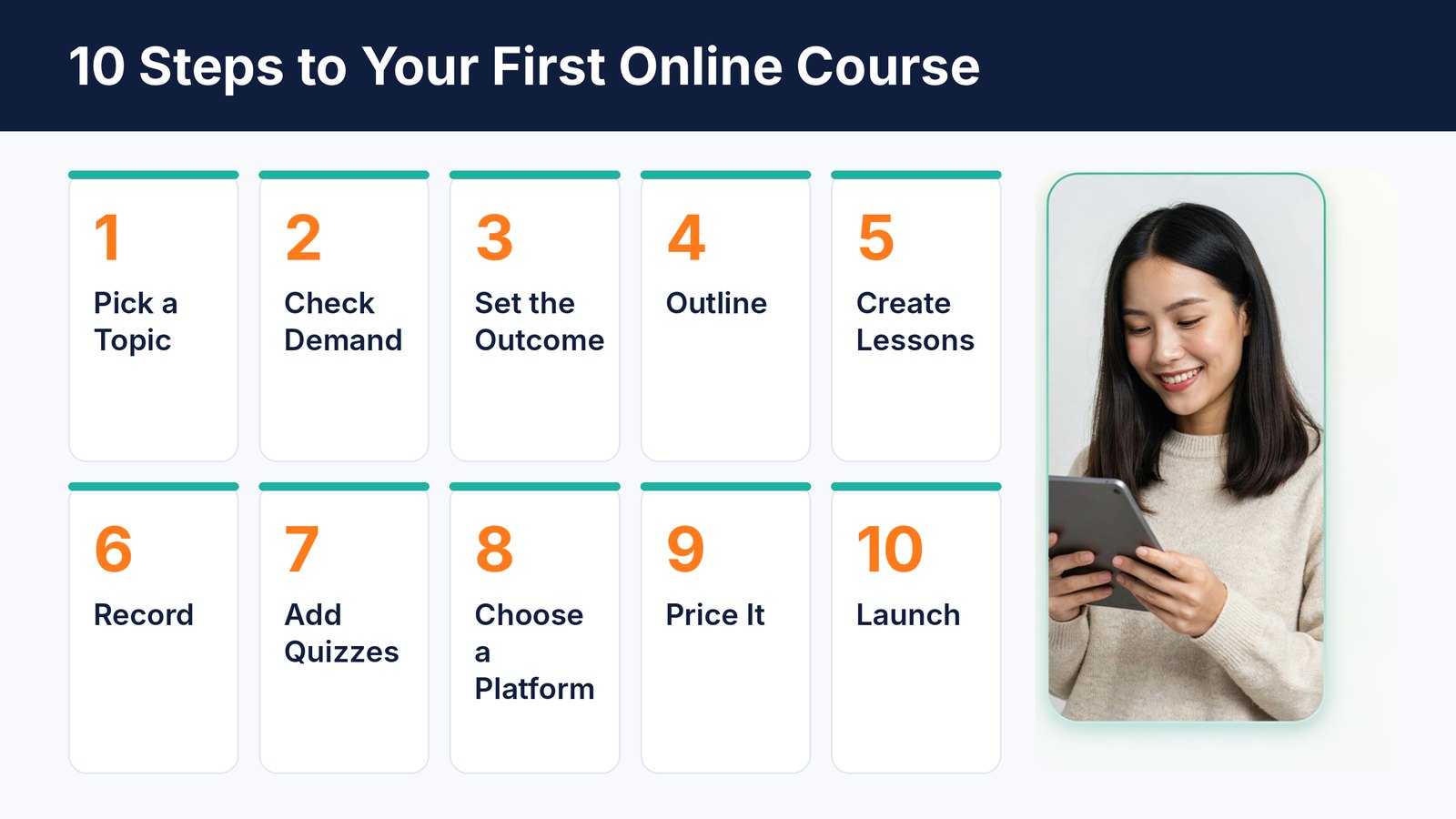
1. Pick a Topic You Know Well
The best course topics sit where three things meet. What you know, what you enjoy, and what people will pay to learn.
Make a list of skills people already ask you about. Friends, coworkers, clients. Those questions are clues.
Then narrow it down. "Photography" is too wide. "Food photography for small cafe owners" is a course people can picture buying.
2. Check That People Want It
Before you record a single video, make sure there's demand. This step saves you months of work.
- Search YouTube and Google for your topic. Lots of questions is a good sign.
- Look at other courses on the same topic. Competition means people are buying.
- Read reviews of those courses. What do students wish was better?
- Ask your audience directly, or offer a presale and see if anyone pays.
If ten people preorder, you have a course. If nobody does, you just saved yourself a lot of time.
3. Decide the One Big Outcome
What will your students be able to do when they finish? Write it as one clear sentence.
"By the end of this course, you'll be able to build a simple budget spreadsheet in Excel." That's a promise people understand.
Every lesson you add should move students toward that outcome. If a lesson doesn't, cut it.
4. Outline Your Course
Now break the big outcome into smaller steps. Each step becomes a module. Each module gets a few short lessons.
A simple course might have 4 to 6 modules with 3 to 5 lessons each. That's plenty.
Put the lessons in a logical order. Start with quick wins so students feel progress early. It keeps them going.
5. Create Your Lessons
Write a short script or bullet points for each lesson. You don't need to read word for word, but notes keep you on track.
Mix your formats to keep things fresh.
- Short videos, ideally 5 to 10 minutes each
- Screen recordings for software lessons
- PDF worksheets, checklists and cheat sheets
- Slides for key ideas
- Real examples students can copy
Shorter is better. Students finish short lessons. Long ones get paused and forgotten.
6. Record Your Videos
You don't need fancy gear. Good sound matters more than a perfect picture.
- Mic. A simple USB or clip-on mic makes a huge difference.
- Light. Face a window or use a ring light.
- Camera. A recent phone or webcam is fine.
- Screen recording. Free tools like OBS Studio or Loom work well.
- Quiet room. Soft things like curtains and rugs cut echo.
Record a test lesson first and watch it back. Fix the sound and light before you record the whole course.
Don't chase perfection. Students care more about clear teaching than polished video.
7. Add Quizzes and Activities
People learn by doing, not just watching. Add a short quiz or task at the end of each module.
Assignments, downloadable worksheets and small projects help the lessons stick. A certificate at the end gives students something to share, which also markets your course for you.
8. Choose Your Course Platform
This is where your course lives. You have three main choices.
| Option | Good For | Watch Out For |
|---|---|---|
| Marketplaces like Udemy | Getting found by new students | Low prices and a big cut of your sales |
| Hosted platforms like Teachable or Kajabi | Quick setup | Monthly fees that grow with you |
| Self-hosted software like CourseFunnels | Full control and low cost | You install it on your own hosting |

CourseFunnels is our own course platform at Teknikforce, built for creators who want to own their course business. It combines a course builder, landing pages and email marketing in one place.
You can add videos from anywhere, including your own uploads, YouTube, Vimeo or Wistia. Add quizzes, assignments, PDFs and slides. Students get automatic certificates when they finish. And it has comments, reviews and questions built in, so students can talk to you.
It runs on your own hosting, so there's no per-student limit and no cut of your sales. Plans start at $5.58 a month, paid yearly.
9. Set Your Price
Pricing is part science, part guts. Here are some simple rules.
- Price by the value of the result, not the number of videos.
- Look at what similar courses charge, then position yourself.
- Offer two or three tiers, like basic, full and premium with live help.
- Add a money-back guarantee. It makes buying feel safe.
Most beginners price too low. You can always run a launch discount, but raising prices later is harder.
10. Launch and Keep Improving
Build a simple sales page, set up a welcome email series and tell everyone you know.
Start with a small launch to friends, followers or your email list. Ask your first students for honest feedback and reviews.
Then improve. Rerecord confusing lessons. Add answers to common questions. A course is never really finished, and that's a good thing.
Want help getting the word out? Read our guide on how to market an online course.
Pick Your Course Format
Not every course has to look the same. Choose the format that fits your topic and your time.
| Format | What It Is | Good For |
|---|---|---|
| Mini course | 3 to 5 short lessons | A first course, or a free lead magnet |
| Self-paced course | Full modules students take anytime | Most topics and evergreen sales |
| Cohort course | A group starts and finishes together, with live calls | Higher prices and more accountability |
| Membership | New lessons every month for a monthly fee | Topics that keep changing |
Many creators start with a mini course, learn what students want, then turn it into a full course.
How to Structure a Great Lesson
A simple structure makes every lesson easier to make and easier to follow. Try this five part flow.
- Hook. Start with the problem this lesson solves. One or two sentences.
- Teach. Explain one idea or skill, step by step.
- Show. Walk through a real example on screen or in person.
- Practice. Give students a small task to try right away.
- Recap. Sum up in a few lines and point to the next lesson.
Use the same flow every time. Students get comfortable, and you'll record faster too.
How to Keep Students Engaged
Many students who buy a course never finish it. That hurts results, reviews and future sales. Here's how to keep people moving.
Give Quick Wins Early
Make the first lesson short and practical. When students get a small result on day one, they come back for more.
Drip Content Over Time
Releasing modules week by week gives people a rhythm and stops them from feeling overwhelmed.
Send Friendly Reminders
A short email when someone hasn't logged in for a week works wonders. Automate it once and it keeps working.
Build a Little Community
Comments, a group or monthly live calls help students learn from each other. People finish more when they don't feel alone.
Celebrate Progress
Quizzes, badges and a certificate at the end give students something to aim for and something to share.
How to Get Your First 10 Students
Your first students are the hardest to find, and the most important. They give you feedback, reviews and word of mouth.
- Offer a founding student price to friends, followers and past clients
- Share your course story on social media while you build it
- Post helpful tips in groups where your students hang out
- Run a free live workshop and invite attendees to join
- Ask your first buyers for honest reviews in return for extra help
Ten happy students are worth more than a thousand random visitors. Treat them well.
Common Mistakes to Avoid
Most first courses run into the same few problems. Here's how to dodge them.
Trying to Teach Everything
A course that covers everything helps no one. Focus on one result and teach only what gets students there.
Skipping Demand Checks
Building a course nobody wants is the most painful mistake of all. Always check demand first, ideally with a presale.
Long, Boring Videos
Hour-long lectures lose students fast. Keep videos short, split big topics, and get to the point.
No Way to Ask Questions
Students get stuck. Give them a place to ask, like comments under each lesson, a group or regular live Q&A calls.
Waiting Until It's Perfect
Your first version won't be perfect. Launch anyway. Real feedback beats months of guessing.
How Long Does It Take?
A focused mini course can be ready in two to four weeks. A full course with several modules usually takes six to twelve weeks, working part-time.
The biggest time savers are a clear outline before you record and one simple tool for the course, the sales page and your emails.
A Simple Launch Checklist
Before you open the doors, run through this quick list.
- Every lesson plays on desktop and mobile
- Quizzes and downloads work
- The checkout takes a test payment and sends a receipt
- New students get a welcome email with login details
- The sales page has your promise, reviews, price and guarantee
- You have a way to answer student questions
- Your analytics and ad pixels are set up
Ask a friend to buy the course and go through it like a real student. They'll spot problems you've stopped seeing.
Final Thoughts
Creating an online course is simpler than it looks. Pick a topic, check demand, outline, record, add some practice, choose a platform, set a price and launch.
Your first course doesn't need to be your best. It just needs to exist.
Start this week. Write your one-sentence outcome today.
FAQs About Creating an Online Course
Do I need to be an expert to create a course?
No. You just need to know more than your students and be able to explain it clearly. Being a few steps ahead often makes you a better teacher for beginners.
How much does it cost to create an online course?
You can start for under $100 with a phone, a USB mic and affordable course software. CourseFunnels starts at $5.58 a month, paid yearly.
How long should an online course be?
As long as it takes to deliver the result and no longer. Many good courses are one to three hours of video, split into short lessons.
Where can I sell my online course?
You can sell on marketplaces like Udemy, on hosted platforms like Teachable, or on your own website with self-hosted software like CourseFunnels.
Can I create a course without showing my face?
Yes. Screen recordings, slides with a voiceover and animated videos all work well. Showing your face helps build trust, but it isn't required.
What should I put in my first module?
A quick welcome, what students will achieve, how to get the most from the course and one quick win they can get right away.
How do I protect my course from being copied?
Use a platform with member logins so only paying students can watch. Video hosts like Vimeo and Wistia let you limit where your videos play. No method is perfect, but these steps stop casual sharing.